
Disable HP printer software updates
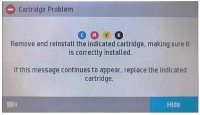
HP is trying to force users to update their software. Don't worry about upgrading, even if you only use original cartridges, as it has no impact on printer performance. From what we know, software updates started rolling out around April 9. Many people have applied the update without even knowing it. The original cartridges affected by this latest update are HP 903XL, HP 953XLCartridges b> and HP 973XL . Here's what some may have seen.....

There is no reason to update your printers' firmware. This will not make a difference in its performance and is intended to prevent the end user from using replacement cartridges. The consumer has the right to decide whether he wants to use original or compatible cartridges.
How to disable HP printer firmware updates
1. Click "Settings" on the printer screen

2. Click “Printer Maintenance”

3. Click “Update Printer”

4. Click "Printer Update Options"

5. Click "Don't check"

HP Printer Firmware Update Notification
This is what the notification from HP looks like...

Click "No" for printer update

After following all the above steps to disable HP printer updates, the good news is that new generic cartridges with updated chips are now available. Yes, the updated chip has been developed and we will be able to purchase it within a few weeks. HP will no doubt continue this crazy tactic, but a solution is always available within a few weeks of these updates appearing.